Baby Preppy: A Minimal Font with Maximum Impact
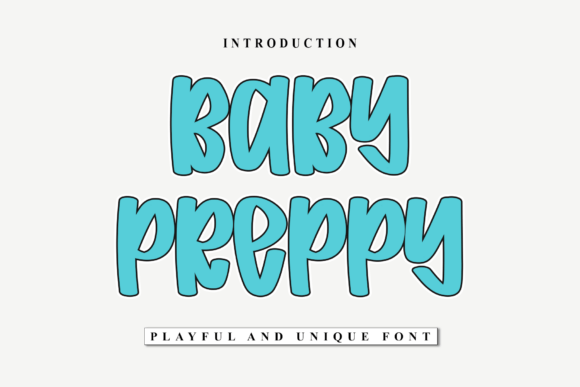
When it comes to typography, simplicity often speaks volumes. Baby Preppy is a clean, minimal font that’s quickly gaining traction among designers, marketers, and content creators. Its neat structure and modern aesthetic make it a versatile choice for a wide range of creative projects. Whether you're designing a logo, crafting a presentation, or building a website, Baby Preppy has the potential to elevate your visual communication without overpowering your message.
Why Baby Preppy Stands Out
Baby Preppy isn’t just another font in a long list of options — it’s a carefully crafted typeface designed with clarity and style in mind. Unlike overly decorative fonts that can distract or complicate a design, Baby Preppy strikes a balance between personality and professionalism. It works especially well in digital environments where readability and visual harmony are key. From social media graphics to branding materials, this font adapts easily to various formats and audiences.
Common Mistakes When Using Baby Preppy
Despite its flexibility, Baby Preppy can be misused in ways that diminish its effectiveness. Here are some common pitfalls and how to avoid them:
1. Overlooking Licensing Details
One of the most overlooked aspects of using any font — including Baby Preppy — is understanding its licensing terms. Some versions may be free for personal use but require a paid license for commercial projects. Failing to verify this can lead to legal issues down the line, especially if you're using the font in marketing materials or products for sale.
Solution: Always check the licensing agreement before downloading or embedding the font. If you're unsure, reach out to the provider or choose a version with clear, permissive terms.
2. Misjudging the Design Context
Baby Preppy’s minimal design makes it ideal for modern, clean aesthetics. However, using it in contexts that require a more traditional or ornate look — like formal invitations or historical-themed branding — can feel mismatched.
Solution: Consider the tone and purpose of your project. Pair Baby Preppy with complementary design elements that reinforce its style rather than compete with it.
3. Ignoring Readability at Small Sizes
While Baby Preppy is highly legible in most cases, some users report issues when using it at very small sizes, especially in print or low-resolution displays. Thin strokes or tight spacing can cause letters to blur together.
Solution: Test the font at different sizes before finalizing your design. If you're working on print materials or mobile interfaces, ensure that text remains clear and readable across all platforms.
4. Skipping Kerning Adjustments
Automatic spacing in design software doesn’t always account for the nuances of every font. Baby Preppy generally handles spacing well, but in certain combinations — especially uppercase letters or tight layouts — manual kerning may be necessary for visual balance.
Solution: Don’t rely solely on default settings. Take a moment to review and adjust spacing where needed, especially in headlines or logos.
What to Check Before Using Baby Preppy
Before you incorporate Baby Preppy into your next project, consider the following factors to ensure a smooth and effective design experience:
- Font Format: Make sure the version you download supports the file types you need (e.g., OTF, TTF, WOFF).
- Character Set: Check if the font includes special characters, accents, or symbols you may need for multilingual or specialized content.
- Compatibility: Test Baby Preppy across different platforms and devices to confirm it renders consistently.
- Brand Alignment: Ensure the font reflects the tone and values of your brand. Minimal doesn’t always mean modern — context is key.
How to Make the Most of Baby Preppy
When used thoughtfully, Baby Preppy can enhance your visual storytelling and help your message shine. Here are some practical tips for getting the most out of this versatile font:
- Pair It Wisely: Combine Baby Preppy with fonts that offer contrast without clashing. For example, pairing it with a bold serif can create a balanced and engaging hierarchy.
- Use It for UI/UX: Its clean lines make it a great option for user interfaces, especially mobile apps and websites where clarity is essential.
- Experiment with Weight: If the font family includes multiple weights (light, regular, bold), use them strategically to guide attention and emphasize key points.
- Test in Real Scenarios: Before launching a campaign or publishing content, preview Baby Preppy in real-world conditions — like on a smartphone screen or printed flyer — to catch any issues early.
Real-World Examples of Baby Preppy Done Right
Many creators have successfully integrated Baby Preppy into their work. For instance, lifestyle bloggers use it for clean, approachable headers that complement soft color palettes. E-commerce brands apply it in product labels and packaging to convey a sense of modern simplicity. Even educators have found it useful for digital presentations that need to feel professional yet inviting.
Final Thoughts
Baby Preppy is more than just a pretty font — it’s a tool that, when used correctly, can significantly enhance your design work. Its minimal and neat appearance makes it adaptable across a wide range of applications, from digital marketing to print design. However, like any creative resource, it requires thoughtful application. By avoiding common mistakes and taking the time to understand its strengths and limitations, you’ll be able to use Baby Preppy to its fullest potential.
Remember, the goal of typography is not just to look good, but to communicate effectively. With Baby Preppy in your toolkit, you’re well on your way to doing just that — as long as you approach it with awareness and intention.