Spooky Bubble: Halloween Font with a Kawaii Twist
Playful, Practical, and Perfectly Spooky-Cute
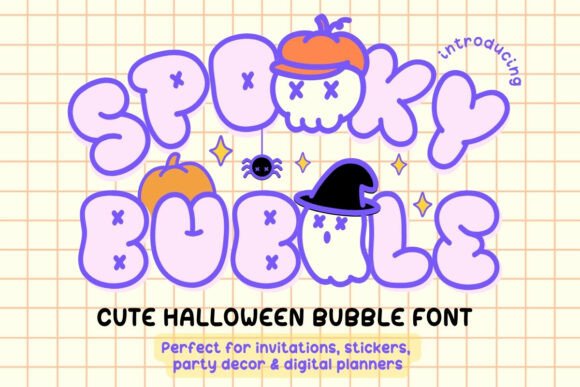
Spooky Bubble Font brings a fresh twist to Halloween design with its kawaii-inspired aesthetic and user-friendly features. Whether you're creating party invites, digital stickers, or social media posts, this font adds a touch of whimsy while staying on theme. Its bubbly, all-caps style and built-in Halloween symbols make it ideal for creators who want to blend spooky and sweet without extra steps or complicated tools.
Two Styles, Endless Possibilities
Spooky Bubble offers two distinct styles—Solid and Outline—that give designers flexibility without sacrificing cohesion. The Solid style works well for bold headings and printed materials, while the Outline style adds a lighter, more decorative touch for digital layouts or layered designs. Both styles maintain a consistent bubble-letter shape, ensuring visual harmony across your projects.
- Solid Style – Great for printed items like stickers, t-shirts, and party banners
- Outline Style – Perfect for digital planners, Canva layouts, and layered Cricut crafts
Designed for Versatility and Ease
One of Spooky Bubble’s standout features is its built-in dingbat symbols. No need to download extra files or switch between fonts—just type from your keyboard and insert pumpkins, ghosts, skulls, stars, and spiders directly into your design. This makes it especially useful for digital creators, educators, and small business owners who need to work quickly without sacrificing visual appeal.
Who Can Benefit from Spooky Bubble?
This font is designed with a wide range of users in mind. Whether you're a blogger crafting Halloween-themed posts, a teacher making classroom decorations, or a small business owner designing seasonal merchandise, Spooky Bubble adapts to your needs. It works seamlessly with popular tools like Canva, Photoshop, Procreate, and GoodNotes, making it accessible even for beginners.
- Bloggers & Influencers – Enhance themed content and printable guides
- Educators – Create festive worksheets, classroom signs, and holiday activities
- Small Business Owners – Design branded Halloween merchandise and promotional graphics
- Digital Creators – Build stickers, planner inserts, and social media templates
From Invites to Merch: Creative Uses for Spooky Bubble
The playful nature of Spooky Bubble opens the door to many creative applications. Here are a few ideas to spark your next Halloween project:
- Halloween Party Invitations – Use the Outline style for a whimsical invite and add ghost and pumpkin symbols for flair
- Digital Stickers & Planners – Combine both styles to create themed headers, bullet points, and decorative elements
- Social Media Posts – Stand out with bold, hand-lettered looks using Solid style text and built-in icons
- Craft Projects – Use with Cricut or Silhouette machines for custom t-shirts, mugs, and wall art
- Printables & Activity Sheets – Make learning or coloring fun with a cute yet spooky font style
- Use Consistent Sizing – Since the font is all caps and bubbly, varying sizes too much can disrupt visual flow
- Pair with Complementary Fonts – Use a simple sans-serif or handwritten font for supporting text to avoid visual clutter
- Balance with White Space – The playful nature of the font works best when given room to breathe in the layout
- Test Across Platforms – Preview how the font looks on different devices and apps to ensure readability
Stickers and Planner Inserts: A Match Made for Halloween
If you're designing digital stickers or planner pages for GoodNotes or Notability, Spooky Bubble adds a clean, themed look without overwhelming the layout. Try using the Outline style for light backgrounds and the Solid style for contrast on darker or patterned pages. The built-in symbols can act as bullet points, section dividers, or decorative accents—no extra design steps needed.
Design Tips for Best Results
While Spooky Bubble is easy to use, a few small adjustments can elevate your final output. Here are some practical tips to keep your designs clear and visually appealing:
Custom Merch and Halloween Crafts
Spooky Bubble is especially well-suited for DIY crafters and small businesses looking to create seasonal merchandise. Whether you're printing mugs, t-shirts, or tote bags, this font brings a fun, recognizable style that appeals to a broad audience. Pair it with black and orange tones or pastel Halloween palettes for different vibes—spooky or soft and sweet.
Why Spooky Bubble Stands Out
In a market filled with Halloween fonts that lean either too scary or too generic, Spooky Bubble strikes a unique balance. Its kawaii-inspired design brings a fresh, approachable feel that’s perfect for modern audiences. Plus, its built-in dingbat symbols and compatibility with major design tools make it a practical choice for creators who want efficiency without compromising on style.
Instant Download, Immediate Creativity
With an instant digital download, you can start using Spooky Bubble right away. No waiting, no complicated installation—just drag, drop, and begin designing. Whether you're working on a quick Halloween post or a full party kit, this font helps you bring your vision to life without friction.
Make Your Halloween Projects Stand Out
Spooky Bubble Font is more than just a seasonal novelty—it’s a versatile design tool that supports a wide range of creative goals. From digital planners to party invitations and custom merchandise, it offers a playful yet polished look that adapts to your needs. Designed with both function and fun in mind, it helps creators bring Halloween cheer in a way that feels fresh, personal, and professional.