Spooky Maddison: A Playful Yet Eerie Font for Halloween and Beyond
Why Spooky Maddison Stands Out in the Crowd
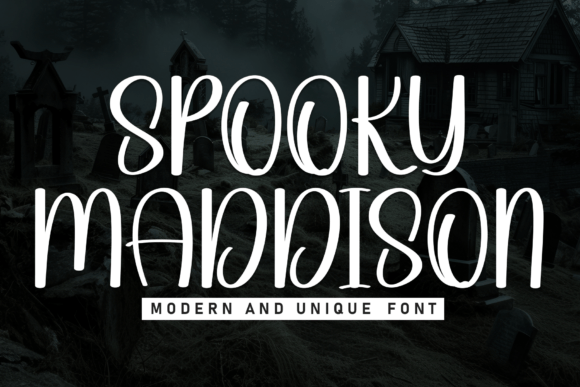
When it comes to seasonal design, especially around Halloween, finding a font that balances fun with fright can be tricky. Enter Spooky Maddison, a modern display font that blends a haunted aesthetic with a whimsical charm. Its tall, stretched letters and decorative flourishes give it a distinctive character that’s both eye-catching and readable. Whether you're designing party invites, social media graphics, or product packaging, this font helps your message pop with a spooky flair that’s hard to ignore.
One of the main reasons people are drawn to Spooky Maddison is its versatility. It works equally well for digital and print projects, and its PUA encoding means you can access all its special characters without needing advanced design software. For creators using tools like Cricut or Silhouette, this is a major plus.
Common Missteps When Choosing and Using Spooky Maddison
Despite its appeal, there are a few pitfalls that users—especially beginners—often fall into when working with Spooky Maddison. Being aware of these can save time, effort, and frustration down the line.
1. Assuming It Works for All Types of Text
Spooky Maddison shines in short, bold headlines, but trying to use it for long paragraphs or small text can lead to readability issues. Some users mistakenly apply it to body copy or fine print, which diminishes its impact and can make the text hard to follow.
Better approach: Save Spooky Maddison for titles, headers, and accent text. Pair it with a clean sans-serif or serif font for body content to maintain legibility and visual balance.
2. Overlooking File Format Compatibility
While Spooky Maddison is PUA encoded and accessible in many programs, not all design tools or platforms support custom fonts the same way. Some users download the font expecting it to work seamlessly in web projects or social media apps, only to find it doesn’t render properly.
Better approach: Always check the file formats included in your download. For digital use, ensure the font is available in WOFF or WOFF2 for web compatibility. For Cricut or Silhouette users, confirm the font supports SVG or DXF formats if needed.
3. Using It in the Wrong Context
Its playful spookiness makes Spooky Maddison ideal for Halloween events or seasonal branding, but some users try to stretch it into more formal or year-round applications. This can confuse the message or feel out of place.
Better approach: Reserve Spooky Maddison for seasonal promotions, themed events, or creative projects where a spooky yet fun tone is appropriate. For more general use, opt for a neutral font that complements your brand year-round.
4. Skipping the Test Before Committing
Before purchasing or downloading Spooky Maddison, many users jump straight into their project without previewing how the font looks in different sizes or colors. This can lead to unexpected results—like distorted glyphs or uneven spacing—especially when printed or cut with machines.
Better approach: Always test the font in your intended format. Use a free sample if available, or create a small test file before committing to a full design. This is especially important for physical crafts or large-format prints.
What to Check Before Downloading or Buying
Not all fonts are created equal, and Spooky Maddison is no exception. Here are a few key things to look for before making your choice:
- Licensing terms: Make sure the font can be used for your intended purpose—whether personal, commercial, or for resale in products.
- Character set: Check if the font includes uppercase, lowercase, numbers, and symbols. Some decorative fonts may lack certain characters, which can limit your options.
- PUA encoding confirmation: If you’re using the font in a machine like Cricut or Silhouette, verify that PUA encoding is included for easy access.
- Designer reputation: Choose fonts from reputable designers or platforms to ensure quality and ongoing support.
How to Maximize the Impact of Spooky Maddison
Using Spooky Maddison effectively isn’t just about avoiding mistakes—it’s about enhancing your design with thoughtful choices. Here are a few tips to help you get the most out of this unique font:
Pair It Thoughtfully
Because Spooky Maddison is so stylistic, it pairs best with simpler fonts. Try using it with a clean sans-serif like Montserrat or a rustic handwritten font for contrast. Avoid combining it with other overly decorative fonts, which can clutter your design.
Play with Color and Texture
Spooky Maddison’s bold structure makes it perfect for experimenting with colors and effects. Try using it in black with a blood-red shadow, or layer it over a grunge-style background for added depth. Just make sure the background doesn’t overpower the text.
Use It for the Right Medium
If you're crafting with a cutting machine, test the font at different sizes to ensure the details cut cleanly. For digital use, keep file sizes in mind—especially if embedding the font on a website or social media graphic.
Final Thoughts
Spooky Maddison is a standout choice for anyone looking to add a touch of spooky fun to their designs. It’s especially useful for Halloween-themed projects, from invitations to packaging. But like any specialty font, it works best when used thoughtfully and appropriately.
By avoiding common mistakes—like using it in the wrong context or skipping compatibility checks—you’ll ensure your final design looks polished and professional. And with a little creativity, you can make the most of its unique character and decorative flair.
Whether you're a seasoned designer or just starting out, taking the time to understand Spooky Maddison’s strengths and limitations will help you create more effective, engaging visuals. So go ahead—let your designs get a little spooky this season.