Pilot Uqbox: A Dynamic Font for Modern Design Workflows
Designers today operate in a fast-paced, multi-platform environment where flexibility and precision are essential. In this context, the Pilot Uqbox font emerges as a valuable asset, especially for those involved in fashion, apparel, and product design. More than just a typeface, Pilot Uqbox is a carefully crafted tool that integrates seamlessly into creative workflows, supporting both conceptualization and execution across a variety of design projects.
What Is Pilot Uqbox?
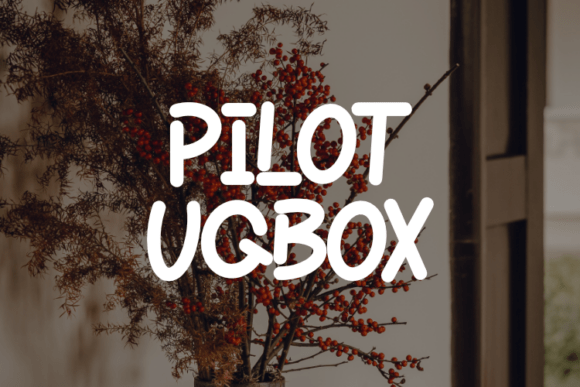
Pilot Uqbox is a modern, versatile font designed with a focus on clarity, adaptability, and visual impact. Its clean lines and balanced proportions make it suitable for a wide range of applications, from clothing tags and t-shirt prints to branding materials and digital assets. The font is available in both OTF and TTF formats, ensuring compatibility with most design software including Adobe Creative Suite, Figma, Sketch, and Canva.
How Pilot Uqbox Fits Into the Design Process
Design workflows often begin with ideation, move through drafting and iteration, and end with final implementation. Pilot Uqbox plays a role at each of these stages. During the early phases, it can be used to mock up visual concepts quickly, helping designers visualize how typography interacts with other design elements. As the project progresses, the font supports consistency across assets, especially when used in conjunction with brand guidelines or style sheets.
Before the Project: Preparation and Planning
Choosing the right font early in the design process can save time and reduce revisions later. When planning a new collection or product line, consider how Pilot Uqbox aligns with your brand identity. Its modern yet approachable aesthetic works well for both minimalist and bold design directions. Before starting a project, it’s helpful to test the font across different mockup templates to assess legibility and visual appeal under various conditions.
During the Project: Integration and Iteration
During the active design phase, Pilot Uqbox shines due to its adaptability. Whether you're working on a clothing label, a promotional poster, or a digital storefront, the font maintains its integrity across sizes and formats. Designers can easily pair it with complementary fonts for headings and body text without losing visual cohesion. Its clean structure also makes it ideal for use in layered designs where readability is key.
After the Project: Consistency and Long-Term Use
Maintaining design consistency across multiple platforms and product types is a common challenge for creatives and business owners alike. Once a project is complete, Pilot Uqbox can be incorporated into asset libraries and design systems to ensure uniformity in future work. This is particularly useful for brands that frequently update their product lines or marketing materials, as the font’s timeless quality helps maintain a cohesive visual language over time.
How Pilot Uqbox Works With Other Tools and Platforms
One of the standout features of Pilot Uqbox is its broad compatibility. It works seamlessly within major design ecosystems, which is crucial for professionals who use multiple tools in their daily workflow. Here’s how it integrates with some common platforms:
- Adobe Photoshop & Illustrator: Ideal for high-quality print and digital design. Pilot Uqbox retains sharpness at any size, making it great for both vector illustrations and raster-based layouts.
- Figma: Perfect for UI/UX designers and digital creators who need a clean, readable font for app interfaces, landing pages, and branding mockups.
- Canva: Especially useful for non-designers or marketers who need a professional-looking font without complex setup. Pilot Uqbox is easy to install and use in Canva’s web-based editor.
- Procreate: For illustrators and digital artists, the font can be used in text overlays or incorporated into digital artwork for merchandise design.
Practical Implementation Tips
To get the most out of Pilot Uqbox, consider the following best practices:
- Test Across Sizes: While Pilot Uqbox is designed for clarity, always preview it at different sizes—especially for small tags or distant signage.
- Pair Thoughtfully: Use Pilot Uqbox as a primary headline or body font, and pair it with a contrasting script or serif font for visual interest in branding or editorial layouts.
- Use in Print and Digital: Because it’s available in both OTF and TTF, you can switch between formats depending on the software you're using without compromising quality.
- Organize Your Font Library: Store Pilot Uqbox in a clearly labeled folder within your font manager to streamline access and prevent duplication.
Real-World Applications
Let’s look at a few practical examples of how Pilot Uqbox can be applied in different professional contexts:
- Fashion Designers: Use it for garment tags, lookbooks, and packaging to create a unified brand experience.
- Product Designers: Ideal for product labels, packaging, and user manuals where legibility and aesthetics are equally important.
- Marketers: Incorporate it into promotional materials, social media assets, and email templates for a modern, clean look.
- Freelancers: Add it to your design toolkit to offer clients a professional, versatile font option that works across multiple mediums.
Ensuring Long-Term Usability
Investing in a font like Pilot Uqbox isn’t just about aesthetics—it's about long-term usability and efficiency. As design trends evolve, Pilot Uqbox remains a reliable choice due to its neutral yet distinctive character. To ensure it continues to serve your needs over time:
- Keep your font files backed up and organized.
- Stay updated with any font updates or version releases from the creator.
- Use it in conjunction with design systems or brand style guides to maintain consistency across all touchpoints.
Conclusion
In a world where design needs to be both functional and visually compelling, Pilot Uqbox offers a practical solution. Whether you're developing a new clothing line, designing marketing materials, or building a brand identity, this font supports your creative process from start to finish. Its compatibility, clarity, and clean aesthetic make it a valuable addition to any designer’s toolkit—helping you streamline workflows, maintain consistency, and deliver high-quality results every time.