Horison Prime: Integrating a Stylish Handwritten Font into Your Creative Workflow
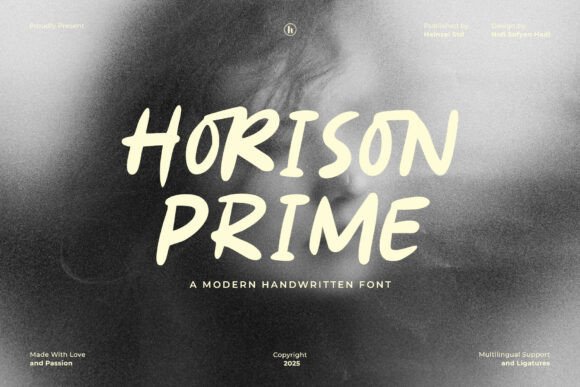
When it comes to visual communication, typography plays a crucial role in setting the tone and personality of a project. Horison Prime stands out as a bold and stylish all-caps handwritten font that brings a personal, handcrafted touch to creative work. Whether you're designing a logo, developing brand assets, or creating social media content, Horison Prime offers a modern casual vibe that resonates with audiences looking for authenticity and warmth.
Unlike standard sans-serif or serif fonts, Horison Prime’s smooth organic strokes provide a sense of movement and individuality. This makes it particularly effective in contexts where a humanized, approachable aesthetic is desired. The font works well across multiple platforms and mediums, including print, digital design, and packaging. Understanding how to integrate Horison Prime into your broader creative process can help you maintain consistency, efficiency, and quality throughout your work.
Before the Project: Planning and Preparation
Before diving into any design project, it’s important to evaluate the role typography will play in supporting your message. If your goal is to convey a sense of authenticity, craftsmanship, or casual elegance, Horison Prime may be a strong candidate for headlines or accent text. Consider how it aligns with your brand voice and whether it complements other visual elements such as color schemes, imagery, and layout structure.
During the planning phase, gather inspiration from design platforms like Behance or Dribbble to see how similar fonts are being used in real-world applications. This can help you visualize how Horison Prime might fit into your own project. Additionally, ensure that you have the appropriate licensing for the font, especially if you're using it for commercial purposes or client deliverables.
Digital Integration: Using Horison Prime in Design Tools
Once you've decided to incorporate Horison Prime into your workflow, the next step is to integrate it into your preferred design tools. Most modern design software—such as Adobe Photoshop, Illustrator, InDesign, Figma, and Canva—supports custom font installation and usage. Horison Prime typically comes in standard font formats like .OTF or .TTF, making it easy to install and use across platforms.
When working with Horison Prime in design tools, it's helpful to maintain a consistent typographic hierarchy. Since it’s an all-caps font, it works best for short text such as headlines, titles, or logos rather than long-form body copy. Pairing it with a clean, minimalist sans-serif font can create a strong visual contrast and enhance readability.
During the Creative Process: Workflow Examples
Let’s walk through a practical example of how Horison Prime can be used during a branding project. Imagine you're designing a logo for a new artisanal coffee shop. The brand aims to communicate warmth, authenticity, and community. Using Horison Prime for the shop’s name adds a handcrafted, personal feel that aligns with the brand identity.
- Step 1: Install Horison Prime on your system and test it in your design software.
- Step 2: Sketch out a few logo variations using Horison Prime as the primary typeface.
- Step 3: Pair it with supporting graphics such as hand-drawn icons or watercolor textures to enhance the organic aesthetic.
- Step 4: Export and review the logo in different contexts—business cards, packaging, and social media—to ensure legibility and consistency.
This kind of structured yet flexible workflow allows you to explore creative options while maintaining a clear direction and purpose. Horison Prime becomes more than just a font—it becomes part of the storytelling process.
After Implementation: Quality Control and Long-Term Use
After your project is completed, it’s important to evaluate how well Horison Prime performed in its intended context. Did it enhance the overall design? Was it legible across different mediums and sizes? Gathering feedback from clients, team members, or your audience can help you assess the effectiveness of your typographic choices.
For long-term use, especially in brand systems or recurring marketing materials, consider creating a style guide that includes Horison Prime as part of your typography standards. This ensures consistency across future projects and makes it easier for team members or collaborators to use the font correctly. Also, keep your font files backed up and organized in a shared asset management system to streamline future access.
Compatibility and Cross-Platform Use
One of the key advantages of Horison Prime is its versatility across platforms. Whether you're working on print media, web design, or digital illustrations, the font maintains its character and readability. However, when using Horison Prime on the web, be aware that custom fonts may require special handling for optimal performance.
If you're embedding Horison Prime into a website, consider converting it to web-safe formats and using tools like @font-face in CSS to ensure compatibility across browsers. Alternatively, use it as a design asset in image-based formats for headers or banners where exact typographic control is necessary. Always test how the font renders on different devices and screen sizes to maintain visual integrity.
Collaboration and Team Integration
When working with others, especially in team-based or client-driven environments, it’s important to ensure everyone has access to the same font files. Horison Prime should be included in shared design kits or asset libraries to prevent font substitution issues. If team members are using different operating systems, confirm that the font works consistently across both Mac and Windows environments.
Additionally, when exporting design files for review or development, embed the font or outline the text to preserve the intended appearance. Clear communication about font usage and file management helps maintain professionalism and reduces the risk of errors during handoffs.
Conclusion: Making Horison Prime a Natural Part of Your Design Toolkit
Incorporating Horison Prime into your creative workflow doesn’t have to be complicated. By understanding its strengths and limitations, planning for compatibility, and integrating it thoughtfully into your projects, you can enhance the visual appeal and emotional resonance of your designs. Whether you're working on a personal passion project or a professional client deliverable, Horison Prime offers a modern, expressive option that fits naturally into a wide range of creative processes.
As with any design asset, the key is to use it intentionally and with purpose. When used effectively, Horison Prime can elevate your work, connect with your audience, and add a distinct personality to your visual communication.